I Built My Own Task Manager (And I Use It Every Day)
Table of contents
I have a problem with organization. Not the kind you fix by buying a fancy planner or signing up for yet another productivity app — I’ve tried both. My problem is more specific: I juggle dozens of simultaneous tasks across different projects, with deadlines ranging from “needs to be done right now” to “someday, maybe.” And no tool I’ve found could handle that spectrum without forcing me to work its way.
If you work in infrastructure and technical support, you know the drill. On any given day I might need to renew an SSL certificate, figure out why a mail server landed on a blocklist, answer a client ticket, and remember that next week there’s a recurring meeting that needs prep. Some of these have a fixed time. Others have a deadline, but a soft one. Others have no deadline at all — they just can’t be forgotten. And across all of these categories, without the right system, things slip through the cracks.
What I tried
Calendars
My first attempt was Google Calendar. It makes sense — it’s free, syncs everywhere, everyone uses it. The problem is that calendars were built for time-bound commitments: meetings, appointments, events. When you try to shove tasks in there, you end up creating fake “events” that block out time slots that don’t really exist. The calendar becomes a nicely color-coded fiction of your day, and before long you stop trusting it. The same goes for Apple Calendar and every other scheduling app — they’re excellent for coordinating with other people, but terrible for managing what you need to do on your own.
Terminal tools
Then I tried TaskWarrior, the darling of terminal dwellers. It’s powerful, configurable, and has an active community. But precisely because it tries to be everything for everyone, the learning curve is steep and the initial setup feels like a project in itself. I wanted a tool that worked for me, not a tool I needed to learn how to tame.
Everything else
Over time I went through other solutions — Todoist, Notion, Trello, apps whose names I can’t even remember. Each one solved part of the problem and created three new ones. Paid tools come with an additional discomfort: the data belongs to them, not you. If the company changes plans, raises prices, or simply shuts down, you lose everything — or become a hostage. For someone who works in technology, relying on a third-party service to organize your own work has a bitter taste of irony.
The decision
At some point it became clear that the problem wasn’t finding the right tool — it was that the right tool didn’t exist. Or rather, it didn’t exist yet. I’m a programmer. I work with servers, automation, infrastructure. I have the skills and the tools to build exactly what I need. Why was I trying to fit my workflow into something someone else designed to solve someone else’s problem?
The answer, of course, is that writing software takes effort. And there’s always that voice saying it’s reinventing the wheel, that someone already solved this, that it’s just a matter of finding the right app. But after years of trying, a different voice won: “you know how to do this — so do it.”
And that’s how FUQU was born.
FUQU from the inside
The dashboard
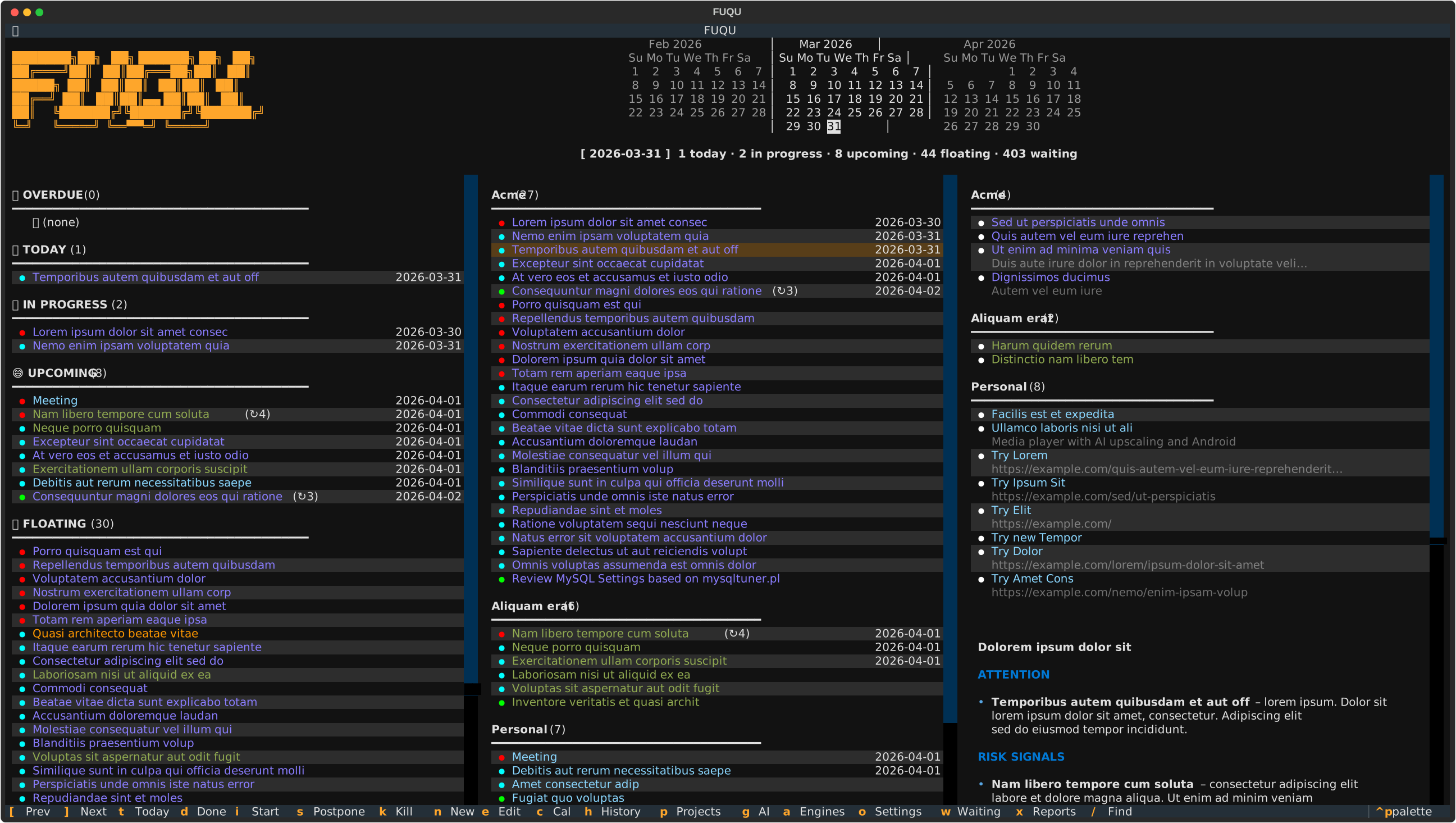
FUQU lives in the terminal — specifically, in an iTerm tab that’s always open. On launch, it displays a dashboard with everything I need to see: tasks organized by deadline and by project, with visual priority indicators. No menus to navigate, no welcome screens, no distractions. Open it, and it’s all there.
Tasks
Adding a new task is a single keypress: “a”. A form pops up, I fill in what’s needed — description, project, priority, deadline — and the dashboard updates immediately. No saving files, no syncing to the cloud, no waiting. The task shows up in the right place, or doesn’t show up at all if the deadline is still far off and I’ve configured it to only appear with a certain lead time.
Each task can be completed, postponed, or killed with a single key. Recurring tasks — the ones that happen every week, every month, or at whatever interval I define — regenerate automatically after being completed. I can set how many days in advance they should appear on the dashboard, so they don’t clutter the screen before it’s time to think about them.
Artificial intelligence
Every time I open the dashboard, an AI model analyzes the day’s tasks and suggests an order of execution. It’s not a rigid plan — it’s a grounded suggestion that takes into account deadlines, priorities, and workload. It works like having someone looking over your shoulder saying “if I were you, I’d start here.”
The same mechanism feeds an automated message that arrives via Telegram in the early hours. When I wake up and pick up my phone, before opening anything else, I already have the full picture of my day. Knowing what’s ahead before sitting down at the computer makes more of a difference than I expected.
Reports
At the end of the week — or whatever period I choose — FUQU generates a report of everything that was done. The AI turns the raw list of completed tasks into a coherent text, organized by project, with language suitable for an accountability report. This is useful both for reporting to the team and for giving myself a high-level view of what I actually produced. Without the report, the feeling at the end of the week tends to be “I worked a lot but I’m not sure on what” — with it, the answer is clear.
The problem, solved
Remember the three categories of tasks from the beginning? The time-bound ones, the soft-deadline ones, and the ones that simply can’t be forgotten? FUQU handles all three without pretending they’re the same thing. Tasks with deadlines show up on the dashboard when it’s time to think about them — not before, not after. Recurring tasks regenerate on their own, without relying on my memory. And those tasks with no deadline, the ones that used to get lost between browser tabs and scattered notes, now have a proper place, visible and organized by project.
No data lives in a cloud I don’t control. Everything sits in a local SQLite database — a single file I can copy, version, and query however I want. The interface is the same terminal I already use all day — no need to open another application, another tab, another mental context. And the AI, instead of trying to replace my judgment, works as a quick summary that saves me the first few minutes of the day trying to figure out where to start.
It’s not a tool for everyone. It’s a tool for me. And maybe that’s the most useful takeaway from this whole process: sometimes the best solution isn’t the one with the most stars on GitHub or the first result in a search — it’s the one you build knowing exactly what you need.
Under the hood
FUQU is written in Python. The terminal interface uses the Textual library, which allows you to build dashboards, forms, and interactive tables without ever leaving the terminal — if you’ve used Claude Code, you know what I’m talking about. TUIs are becoming increasingly popular, and for good reason: they’re lightweight, fast, and live in the same environment where most of the work already happens.
Data is stored in a SQLite database — a single file, no server, no external dependencies. Easy to copy, easy to version, easy to query directly if needed. For anyone who has ever had to migrate data from one service to another, the simplicity of a file you fully control is liberating.
The AI layer uses the Cerebras API as its primary provider, with a fallback to a local LM Studio instance when the external service is unavailable. This redundancy ensures that daily briefings and reports are always generated — the worst thing an automation can do is fail silently.
The morning Telegram alert is sent via the official Telegram Bot API, scheduled through macOS’s launchd.